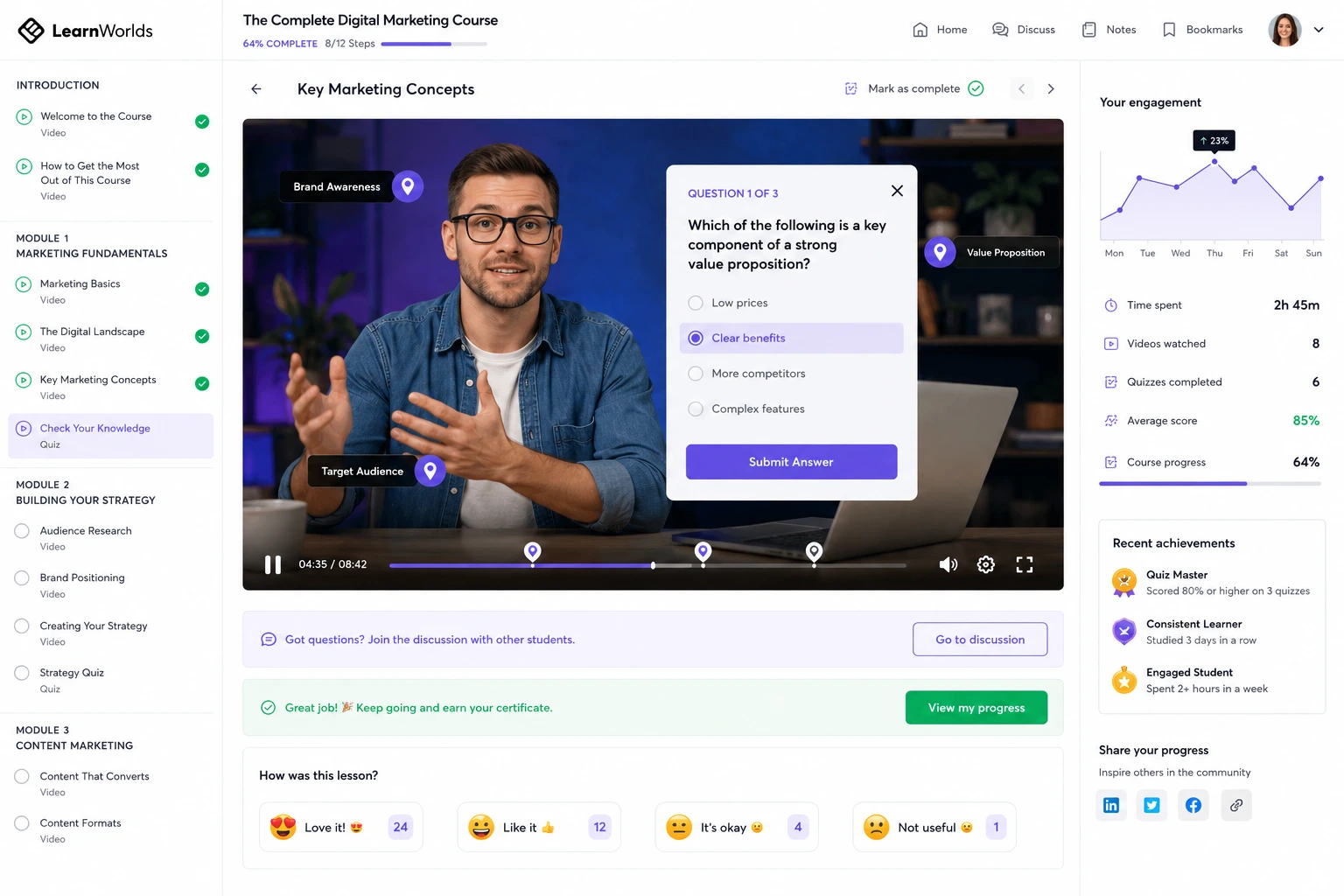
One of the biggest challenges when you create course online is keeping students actually engaged. Passive video watching leads to high drop-off rates—I’ve seen courses with great content lose 60-70% of learners midway because there’s no active participation.
LearnWorlds tackles this head-on as an online class platform designed for interactive learning. Its built-in tools turn static content into dynamic experiences that encourage clicks, responses, discussions, and progress. Features like interactive videos with AI help, quizzes, communities, and more make students feel involved, not just spectators
In this post, I’ll cover the main interactive features, how to use them effectively, and real strategies that have worked for creators I’ve advised. These can dramatically improve completion rates and satisfaction.
Why Interactive Features Matter for Engagement on LearnWorlds
Interactive elements shift learning from passive to active. When students answer questions mid-video, react with emojis, or join discussions, they retain more and stay motivated.
LearnWorlds stands out here—many platforms add interactivity as afterthoughts or require integrations. Here it’s native: interactive video editor, AI-generated questions, assessments, communities, and mobile push notifications. This leads to higher engagement without extra tools or costs.
Research consistently shows interactive content boosts retention—LearnWorlds users often report better outcomes thanks to these built-in options.
Key Interactive Features to Boost Student Engagement
LearnWorlds packs powerful tools:
- Interactive Video Editor — Add pop-up questions, hotspots, clickable buttons/CTAs, tables of contents, transcripts, and social reactions (emojis/comments) directly in videos. AI can auto-generate questions and subtitles.
- Quizzes & Assessments — Multiple types (multiple choice, fill-in, matching), question banks, self-assessments, graded exams, and immediate feedback. Embed in lessons or videos.
- Assignments & Surveys — File uploads, text responses, polls for reflection or feedback.
- Ebooks & SCORM — Interactive ebooks with highlights/notes, plus support for advanced SCORM content.
- Communities & Discussions — Built-in social spaces for comments on course pages/videos, peer feedback, emoji reactions, and threaded discussions.
- Live Sessions — 1:1 or group live video for real-time interaction.
- Certificates & Gamification Elements — Progress tracking, personal notes/library, and completion rewards.
These features work together—e.g., a quiz in a video can unlock the next module, creating momentum.
Step-by-Step: Adding Interactive Elements to Your Courses
Here’s how to implement interactivity practically:
- Upload or select a video in a lesson → open the Interactive Video Editor.
- Use AI to generate questions: Click “Generate questions with AI” — it analyzes content and suggests pop-ups at key timestamps.
- Customize interactions: Add hotspots (clickable areas linking to resources), multiple-choice questions, CTA buttons (e.g., “Join discussion”), or emoji reactions.
- Set branching/behavior: Make questions required, add feedback messages, or link to external resources.
- Insert non-video interactivity: In course outline, add quiz/assignment sections after lessons. Use form builder for reflections.
- Enable community features: Turn on discussions per section or course-wide for peer comments.
- Add live elements: Schedule group sessions or 1:1 bookings via calendar widget.
- Track & refine: Use analytics (plays, drop-offs, interaction rates) to see what works—adjust low-engagement spots.
Start with 2-3 interactions per module to avoid overwhelming students.
Real-World Example and Data Insight
A language instructor I worked with had flat completion rates (~35%) on plain videos. Switching to LearnWorlds, she added AI-generated pop-up questions every 3-5 minutes, hotspots for vocabulary links, and discussion prompts at video ends. Community threads let students share recordings for peer feedback.
Result: Completion jumped to 68%, with average interaction rate (questions answered) over 80%. Students left positive feedback about feeling “guided” through the material.
Insight: Interactive videos on LearnWorlds can significantly improve engagement—many creators see retention gains because learners participate actively instead of passively watching. Compared to platforms without native interactivity, this reduces the need for external quiz tools.
Common Mistakes and Troubleshooting Engagement Issues
- Adding too many interactions — Overload causes frustration. Fix: Limit to 3-5 per video/lesson.
- Ignoring analytics — Don’t set and forget. Fix: Review drop-off points weekly and tweak.
- Weak feedback — Generic responses bore students. Fix: Personalize AI-generated questions or add encouraging messages.
- Not promoting community — Silent forums stay empty. Fix: Seed with your own comments, prompt participation in videos.
- Mobile oversight — Test interactions on app; some elements behave differently. Fix: Use branded app for push reminders.
- No variety — Repetitive quizzes tire learners. Fix: Mix question types, assignments, and live sessions.
Monitor metrics closely and iterate.
Frequently Asked Questions
How do interactive videos improve engagement on LearnWorlds?
They turn passive viewing into active participation with questions, hotspots, and reactions—keeping learners focused and boosting retention.
Does LearnWorlds use AI for interactive features?
Yes—AI generates questions, subtitles, and suggestions automatically in the video editor and course builder.
Are communities good for boosting course engagement?
Absolutely—built-in discussions, reactions, and peer feedback create social accountability and support.
What plans include advanced interactive tools?
Most core features (interactive video, quizzes) on Pro Trainer+; full AI and unlimited options on higher plans.
How can I track if interactivity is working?
Use built-in reports: interaction rates, drop-offs, completion per section, and engagement analytics.
Where can I learn more about LearnWorlds interactive features?
Check their official guide: LearnWorlds Interactive Video.
Start Boosting Engagement Today with LearnWorlds
LearnWorlds makes it straightforward to add meaningful interactivity that keeps students coming back. Interactive videos with AI, quizzes, communities, and live elements create active learning experiences that improve completion, satisfaction, and results.
If you’re making online courses and want higher engagement without extra hassle, these features are game-changers.
Try adding a few interactive elements to your next module—start small and watch the difference. Head to the free trial and experiment.For more strategies on course design or engagement tactics, visit https://shihabmorshed.com/. What’s your biggest engagement challenge right now? Share in the comments—I’ll offer quick suggestions.